
XClicker
Precision Click & Key Automation · Built by Adarsh Devol for Xharvoc Ltd.
An ultra-lightweight, 100% offline Windows automation utility built for accessibility support, UI QA testing, and repetitive workflows — featuring sub-second intervals, randomised jitter, background window targeting, and custom global hotkeys with zero ads or telemetry.
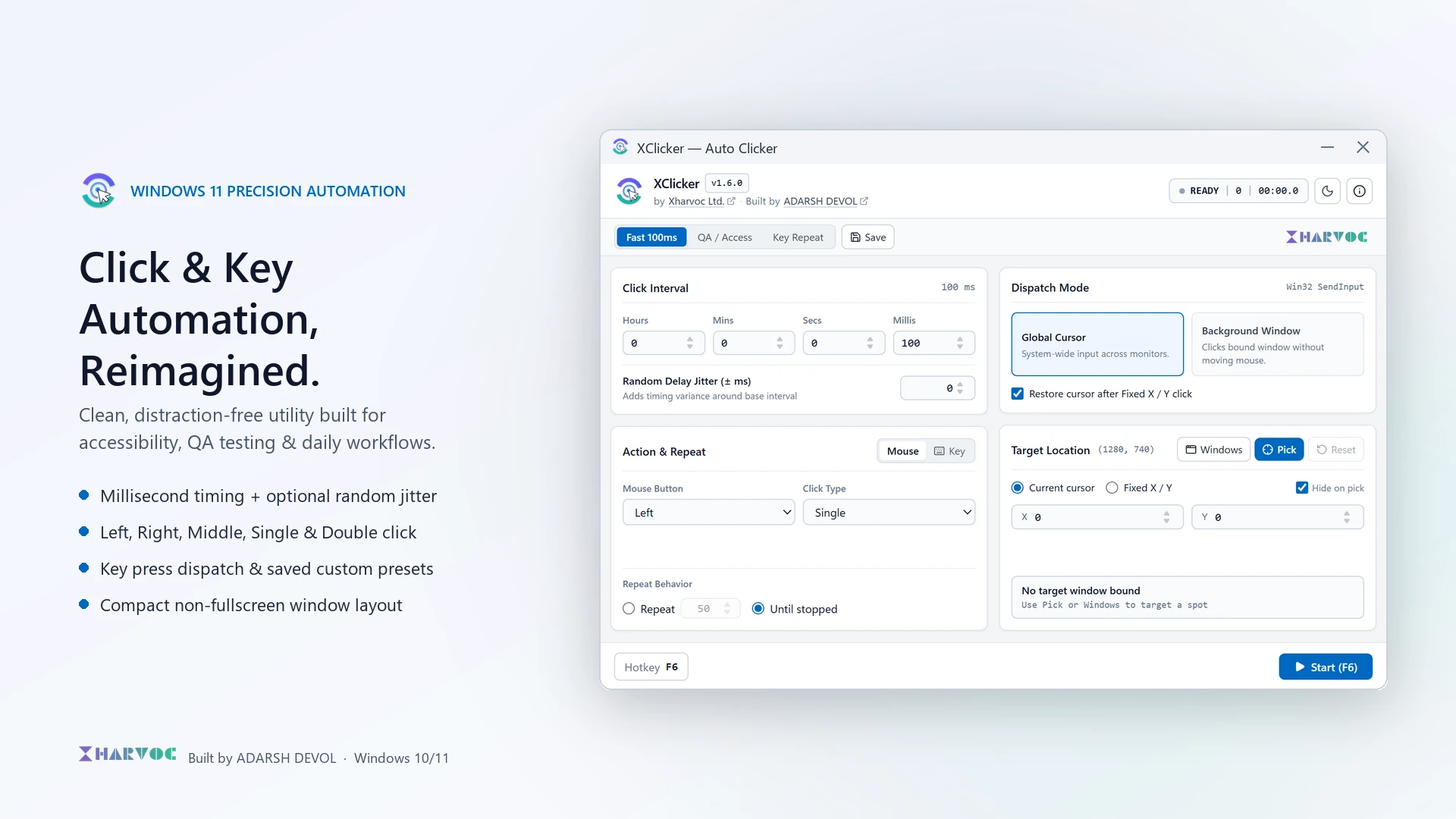
Engineered for Precision Without Clutter
Every capability inside XClicker runs locally via native Rust and Windows Win32 APIs in a compact, non-intrusive desktop window.
Millisecond Intervals & Action Types
Configured cleanly for accessibility, UI QA testing & repetitive desktop workflows
Configure exact click or keypress intervals down to 10 ms, add optional randomised timing jitter (± ms), and choose between single or double clicks across left, right, or middle mouse buttons.
- Hours, minutes, seconds & milliseconds schedule builder
- Optional random delay jitter (± ms) around your base interval
- Repeat until stopped or execute a fixed action count
- One-click presets (Fast 100ms, QA / Access, Key Repeat) plus local profile save
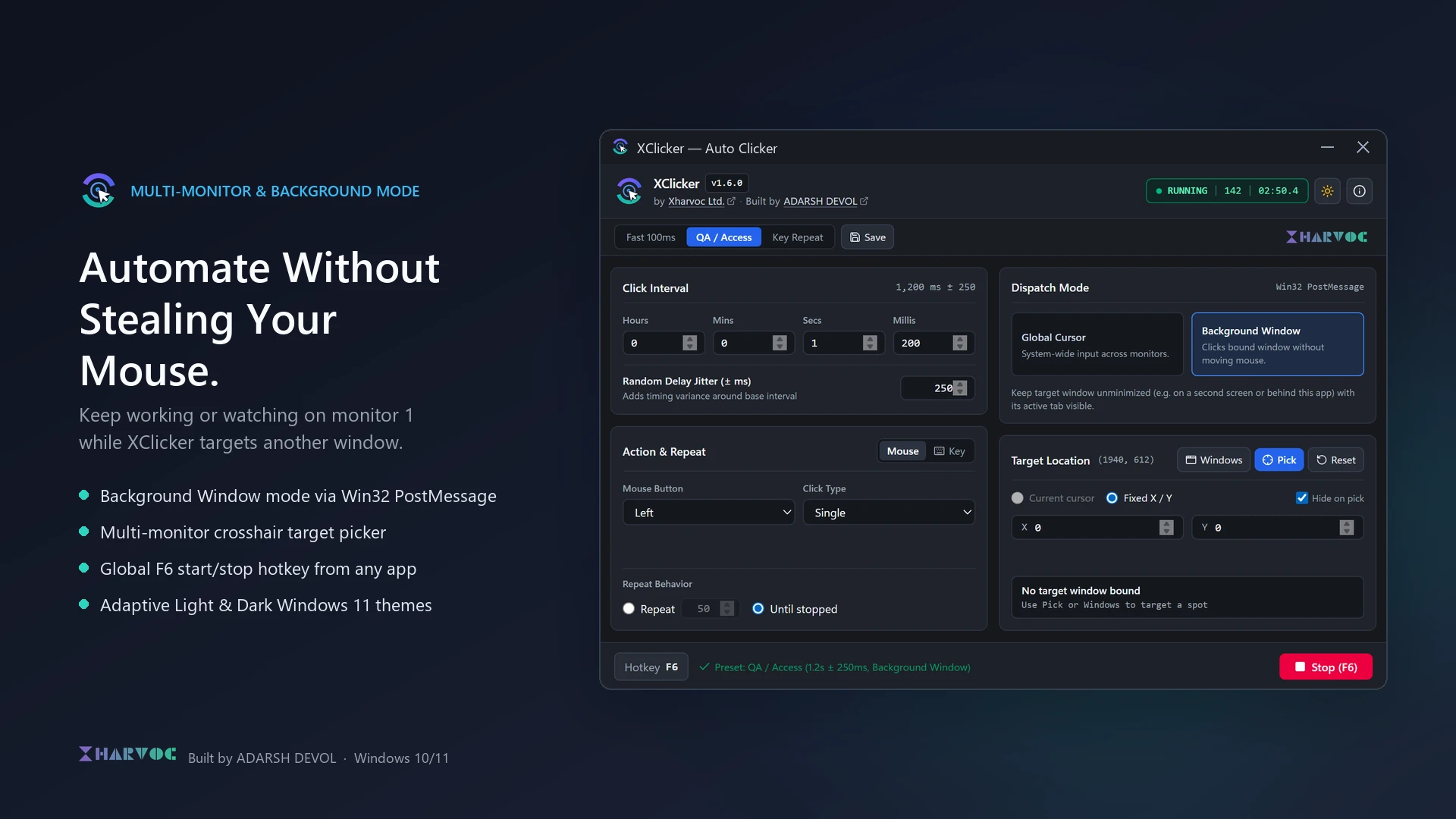
Background Window Targeting & Screen Picker
Keep using your primary cursor while XClicker automates a bound window
Dispatch clicks directly to a selected target window or child control via Win32 PostMessageW so you can keep working across monitors without hijacking your cursor, or inspect exact coordinates with the full-screen crosshair picker.
- Global SendInput mode with optional cursor-restore toggle
- Background Window mode via Win32 PostMessageW client coordinates
- Crosshair target picker spanning negative & secondary monitor coordinates
- Open-window selector displaying window title, process name & HWND
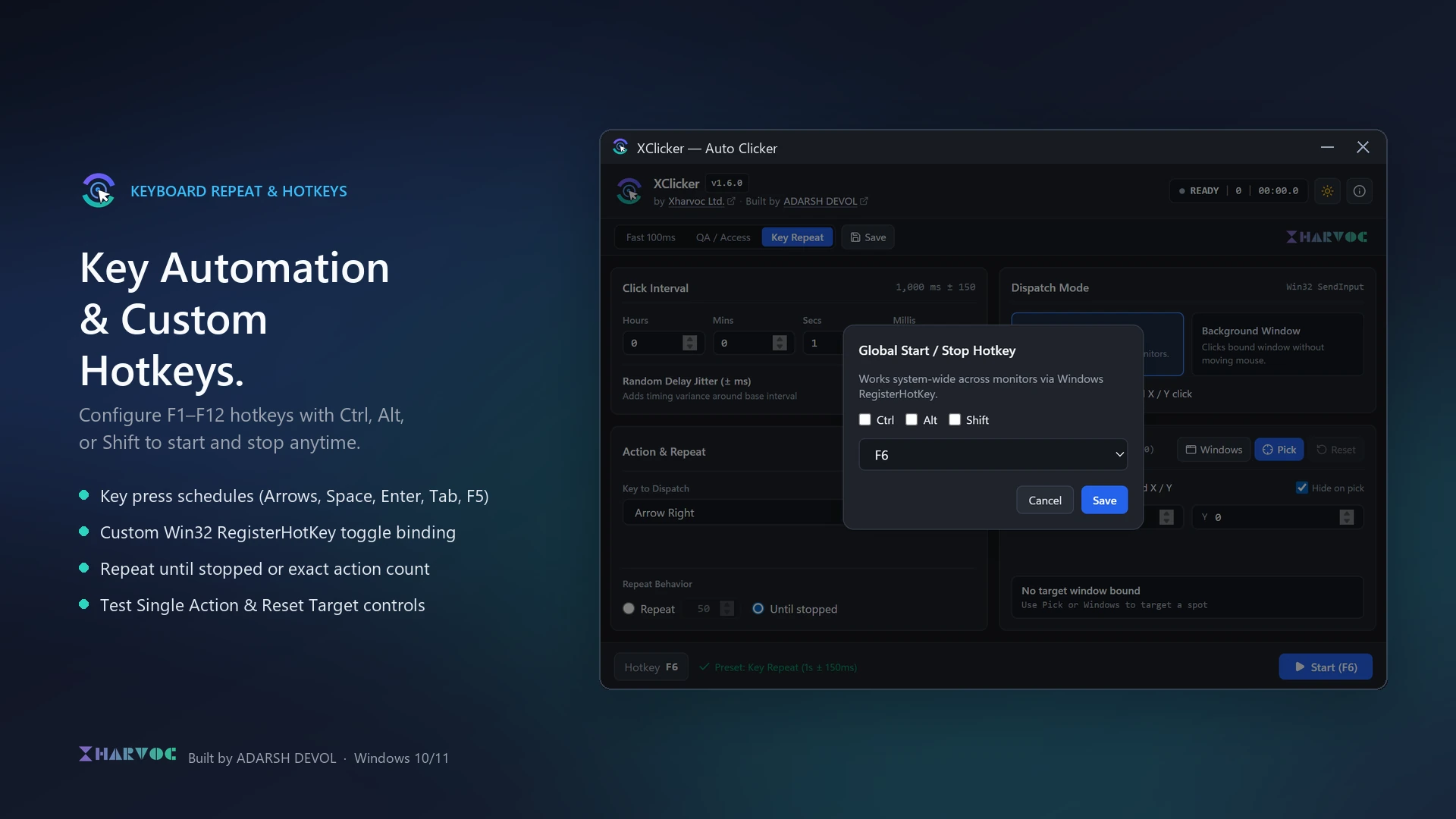
Keystroke Repeats & Global Toggle Hotkeys
Start or stop anytime from any foreground window
Switch seamlessly to Key Press mode for pagination or QA workflows using Arrow keys, Space, Enter, Tab, or F5, and bind any F1–F12 hotkey (with optional Ctrl, Alt, or Shift modifiers) via native Win32 RegisterHotKey.
- Supports ArrowRight, ArrowLeft, ArrowUp, ArrowDown, Space, Enter, Tab & F5
- Customisable system-wide hotkey modal (F6 default)
- Test Single Action button to preview one dispatch safely
- Real-time READY / RUNNING header counter with click count & elapsed timer
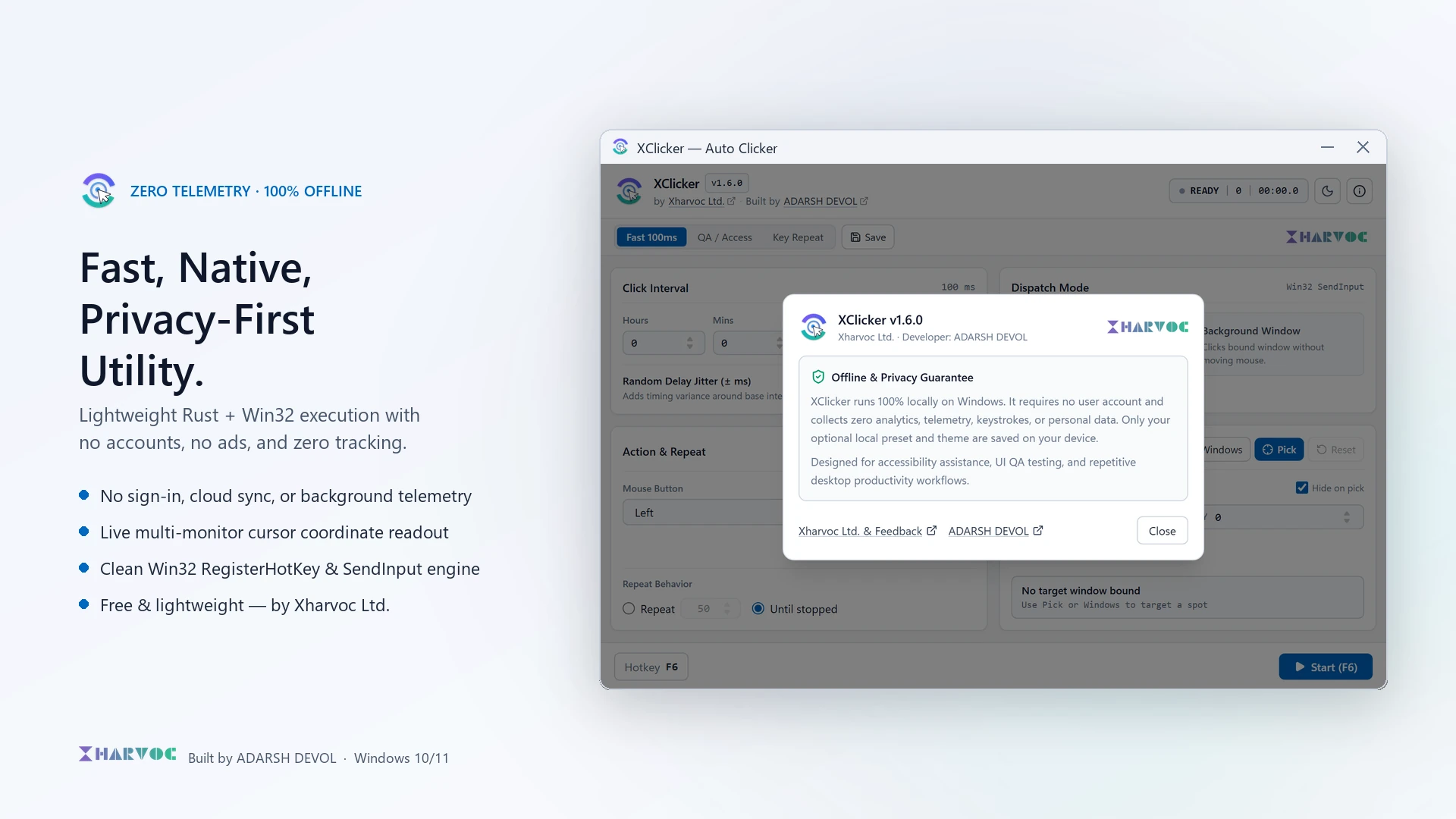
100% Offline, Compact & Privacy-First
Built natively with Rust, Tauri & Win32 — zero accounts or tracking
XClicker launches directly to work with zero sign-up walls, zero background network calls, zero advertising SDKs, and adaptive Fluent Light and Dark themes inside a compact non-fullscreen desktop window.
- Verified zero telemetry, analytics, or remote data collection
- No internet connection required after Microsoft Store installation
- Adaptive Windows 11 Light & Dark appearance saved only locally
- Published free by Xharvoc Ltd. & engineered by Adarsh Devol
Native Windows Architecture by the Numbers
Fast startup, minimal memory footprint, and zero external cloud dependencies

Official XClicker brand mark — designed for crisp Windows 11 Store and Start Menu scaling.

Minimalist orbital cursor visual — packaged cleanly for Windows 10/11 x64 MSIX release.
Frequently Asked Questions
Everything you need to know about XClicker
What is XClicker designed for?
XClicker is a lightweight Windows 10/11 desktop automation utility designed for accessibility assistance (reducing repetitive wrist/finger strain), automated UI QA testing, slide/document stepping, and repetitive desktop workflows.
How does Background Window mode avoid stealing my mouse?
When you bind a target window using Pick or the open Windows list and select Background Window mode, XClicker converts your screen coordinates to window-relative client coordinates and sends standard Win32 PostMessageW events directly to that window while your physical mouse remains free.
Why does XClicker declare Windows runFullTrust capability?
Standard desktop Win32 applications packaged via MSIX declare runFullTrust so Windows allows them to call standard desktop APIs outside a sandboxed AppContainer — specifically SendInput, PostMessageW, EnumWindows, GetCursorPos, and RegisterHotKey. All actions are user-initiated and run strictly locally without elevation.
Does XClicker collect keystrokes, screen contents, or analytics?
No. XClicker is 100% offline with zero telemetry, zero analytics SDKs, and zero background network calls. No coordinates, keystrokes, or window titles ever leave your computer. Only your optional theme preference and saved interval preset live locally on your PC in WebView2 localStorage.
Can I change the default F6 Start/Stop hotkey?
Yes. Click the Hotkey button in the bottom status strip to pick any function key from F1 through F12 paired with optional Ctrl, Alt, or Shift modifiers, so it never conflicts with your active workflows.
What versions of Windows are supported?
XClicker supports 64-bit Windows 10 (build 17763 or later) and Windows 11 Desktop systems running Evergreen Microsoft Edge WebView2 (pre-installed on Windows 11 and modern Windows 10 systems).
XClicker Privacy Policy
Effective Date: 28 November 2026Package Identity: XharvocLtd.XClicker
1. Overview, Publisher & Scope
XClicker is a free, standalone, offline Windows automation utility developed by Adarsh Devol and published by Xharvoc Limited (Company No. 16590285, registered in England & Wales, 71–75 Shelton Street, Covent Garden, London, WC2H 9JQ, United Kingdom). It is engineered for accessibility assistance, UI QA testing, and repetitive desktop productivity tasks.
This privacy notice applies specifically to the XClicker Windows desktop application distributed through Microsoft Store (XharvocLtd.XClicker). For website visitors and corporate B2B services on xharvoc.co.uk, please also refer to the Xharvoc Limited Group Privacy Policy.
2. Zero Personal Data Collection & Zero Telemetry
XClicker does not access, collect, log, store remotely, transmit, or sell any personal data:
- No accounts or sign-in: Works immediately after installation without registration.
- No analytics, ads, or crash SDKs: Contains zero advertising identifiers, trackers, or third-party telemetry libraries.
- No background network traffic: External websites open in your default browser solely when you explicitly click a publisher or feedback link.
- No capture of input or screen data: Mouse coordinates, keystrokes, window titles, process names, and screen contents are never recorded, stored remotely, or shared — zero international data transfers occur from the application.
3. Local-Only Device Storage
Only your optional UI preferences — your selected Light/Dark theme (xclicker_theme_v1) and one optional locally saved interval profile (xclicker_saved_profile_v1) — are stored exclusively on your local computer inside Windows WebView2 localStorage. You can reset or overwrite your saved target and interval settings inside XClicker at any time, and uninstalling XClicker removes all application state cleanly.
4. Windows Capabilities (runFullTrust) Transparency
To dispatch automation events outside a sandboxed AppContainer, the Microsoft Store MSIX package declares runFullTrust. Below is every Win32 API family used locally by XClicker:
| Win32 API | Functional Purpose | Privacy & Control Scope |
|---|---|---|
| SendInput | Dispatches user-configured mouse clicks or keyboard presses in Global mode | Executed only after the user presses Start or Test |
| PostMessageW | Sends clicks or key events to a user-bound window handle without stealing focus | Targets solely the HWND picked by the user via Pick or Windows list |
| EnumWindows / WindowFromPoint / ScreenToClient | Identifies visible windows and translates virtual-screen coordinates during target picking | Never captures screenshots, keystrokes, or window content |
| QueryFullProcessImageNameW | Displays executable file names (e.g. notepad.exe) alongside picked window titles | Read-only local UI metadata via PROCESS_QUERY_LIMITED_INFORMATION |
| GetCursorPos / SetCursorPos | Shows live cursor X/Y coordinates and optionally restores the cursor after fixed-spot clicks | Runs locally in memory; coordinates are never logged or transmitted |
| RegisterHotKey / UnregisterHotKey | Enables a system-wide toggle shortcut (default F6) so automation can stop anytime | Listens solely for the user's chosen Start/Stop hotkey combination |
5. Support, UK GDPR Rights & Contact Information
For product support, bug reports, feature requests, or data-protection enquiries relating to XClicker, contact Xharvoc Limited at [email protected] or [email protected], or submit an enquiry via our Contact Page. Under the UK GDPR and Data Protection Act 2018, you retain full rights of access, rectification, erasure, and complaint to the UK Information Commissioner's Office (ICO).